 Malaysia
 Singapore
 Thailand

A digital door lock, often called an electronic lock, digital lock or smart lock, is one of the most popular additions when Singaporeans renovate or buy a new home or office. Much sleeker and more stylish than traditional door locks, digital lock models are becoming more common as prices fall.
Every home is different and so are your needs. However, the factors to pick the right smart lock for your home or office are the same. Here is a guide to choosing the best smart lock for any door, from an HDB flat to a condo to your office.
Choosing the best digital lock
Buying your first smart lock or need help choosing the right one? We answer your questions from basic to in-depth. To start, here are the main factors you have to consider.
Security
- Encryption: Look for digital locks that use strong encryption to protect against hacking attempts.
- Tamper resistance: Choose locks that have anti-tamper features to deter physical attacks.
- Lockout & alarm features: Opt for locks that have built-in lockout and alarm functions.
- Access control: Some digital locks offer multi-factor authentication, such as PIN codes and biometrics (fingerprint, retina scan, etc.), which can enhance security.
- Camera and audio: A digital lock with camera and audio allows you to see and hear what’s happening at your door, wherever you may be.
Durability
- Weather resistance: If the lock will be used outdoors, ensure it is weather-resistant or rated for outdoor use.
- Build quality: Look for locks made from sturdy materials like stainless steel to ensure durability.
Compatibility
- Door: Make sure the lock is compatible with the material of the door as well as its thickness. The handle should also fit inside the gate of your home.
- Smart home integration: If you have a smart home system, check if the lock is compatible with it.
Power Source
- Battery life: Digital locks are typically battery-operated, so consider the expected battery life and whether it meets your needs.
- Backup power: Some locks have backup power options, like a physical key or an external power source, in case the batteries run out.
Ease of Use
- User-friendly interface: Ensure the lock’s interface is intuitive and easy to use.
- Remote access: Look for locks that can be controlled remotely through a smartphone app or web portal for convenience.
Installation
- DIY installation: Determine if you can install the lock yourself or if you need a professional.
Maintenance
- Firmware updates: Check if the manufacturer provides regular firmware updates for security improvements.
For a comprehensive guide on how to choose the best digital lock or smart lock, see my in-depth but easy-to-use 7-step guide.
Best digital locks and smart locks for your home & office
Here are the best digital lock models in Singapore right now. We consider price as a major factor in our ranking, so some smart locks with more features may appear below simpler models.
| Name | Best for | Key highlight |
|---|---|---|
| Sifely Smart Lock | Fast entry and simple DIY installation | 3D fingerprint unlock in under 0.3 seconds with no-drill installation |
| Aqara U100 Smart Lock with Apple Home Key | Apple Home users | Apple Home Key support via iPhone and Apple Watch |
| Harfo Smart Lock | Offices or properties with many users | Supports up to 300 users with remote access options |
| Yale | LiftMaster Smart Lock | Managing multiple doors from one app | Integration with LiftMaster MyQ system |
| Olumat OL-0825 Smart Lock | Buyers who prioritise after-sales support | 30-day money-back guarantee, warranty and lifetime support |
| Tapo DL100 Smart Wi-Fi Deadbolt Door Lock | Smart home users wanting broad connectivity | Wi-Fi, Bluetooth, voice assistants and activity logs |
| eLink Smart Fingerprint Lock | Warehouses and large offices | Supports up to 1,000 users with weatherproof construction |
| HD20 Face Recognition Digital Lock | Visual monitoring at the door | Integrated HD video display and face recognition |
| HAIFUAN 5800 Digital Lock | Budget-conscious buyers | Affordable option with stainless steel build and password masking |
| Aqara D200i Smart Lock | Advanced Apple Home integration | 3D face recognition and 9 unlocking methods |
| Aqara A100 Smart Lock | Apple Home users seeking a lower-cost Aqara option | Apple Home compatibility with 9 unlocking methods |
1. Sifely Smart Lock
Why buy: Quick unlock, DIY no-drilling installation

If you are in a hurry to get out of the sun, the Sifely Smart Lock is the way to go. With Advanced 3D Fingerprint Unlock, it’s ‘Open Sesame’ virtually instantaneously (less than 0.3 seconds).
It installs in minutes, too, with just a Phillips-head screwdriver and no drilling required. On the other hand, its 4 AA batteries last up to 1 year.
You get the convenience of secure 6-in-1 keyless entry: fingerprint, passcode, wireless key fob, card, smartphone and physical key. Pair it with a Sifely WiFi Gateway (sold separately) to lock and unlock your smart door lock from anywhere and at any time, set up codes remotely and even check access logs in real time.
Buy now from Amazon
2. Aqara U100 Smart Lock with Apple Home Key
Why buy: You want to integrate and control access with Apple Home

Living the Apple life? Then, the Aqara U100 will fit neatly into your Apple Home. Unlock it with Apple Home Keys using your iPhone or Apple Watch, even when the battery’s dead.
A high-precision fingerprint reader recognises up to 50 fingerprints, and the device can be remotely configured with passwords via the Aqara Home app (Aqara Zigbee 3.0 Hub sold separately).
The Hub also allows you to integrate with the Aqara Home app as well as third-party ecosystems like Alexa and IFTTT.
Buy now from Amazon
3. Harfo Smart Lock
Why buy: If you need to let up to 300 different people in

The Harfo Smart Lock can be installed at home or the office but its 300-user memory makes it better suited for the latter. They can gain entry via fingerprint, passcode, IC card, app and physical keys. The auto-lock, anti-peep & Private Mode functions make for a safer and more secure home.
Using a gateway (sold separately), you can control access remotely and integrate it with Alexa and Google Assistant, even using voice control to manage the entire ecosystem.
Best of all, it’s a no-drill, DIY installation-ready unit, and all you need is a Phillips-head screwdriver.
Buy now from Amazon
4. Yale | LiftMaster Smart Lock
Why buy: The 180-year reliability of the Yale brand

Most of us recognise the Yale brand and you can now extend that to digital locks with the Yale LiftMaster Smart Lock. Its standout feature is seamless integration with LiftMaster’s MyQ system, allowing you to control multiple doors from a single app.
It supports keyless entry through smartphone control and voice commands (via Alexa or Google Assistant). Once inside, simply tap the keypad to auto-lock the door. Grant remote access when you are out and still track access through activity logs.
Buy now from Amazon
5. Olumat OL-0825 Smart Lock
Why buy: 30-day money-back guarantee, 1-year product warranty and lifetime customer support

The Olumat OL-0825 Smart Lock should be the go-to digital lock for anyone who is super cautious about everything they buy. Besides the 1-year warranty, there is a 30-day money-back guarantee for the short term and lifetime customer support for the long term.
You can install it yourself with just a Phillips-head screwdriver, and no holes have to be drilled. Once it’s up and running, you have multiple keyless entry options, including fingerprint recognition, code input, key fob and app control, as well as a physical key.
With the convenient auto-lock feature, there is the peace of mind knowing that your home is always secure.
Buy now on Amazon
6. Tapo DL100 Smart Wi-Fi Deadbolt Door Lock
Why buy: Back-to-basics design & price with advanced connectivity & features
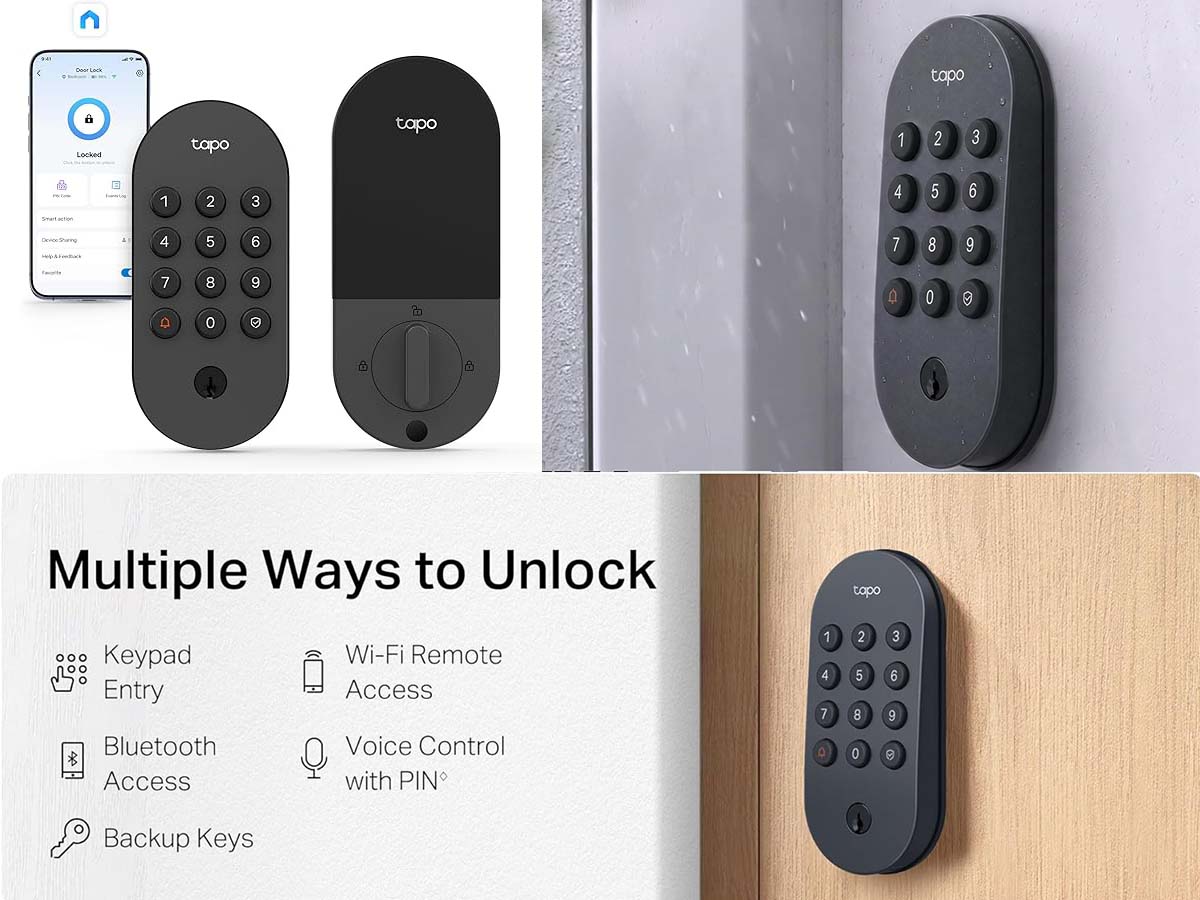
The Tapo DL100 Smart Wi-Fi Deadbolt Door Lock is very versatile. It can be unlocked via a keyless backlit tactile keypad, Bluetooth for nearby entry, and remote Wi-Fi via the Tapo App, as well as voice commands with PIN verification for Alexa, Google Home and Samsung SmartThings. 2 physical backup keys are also included.
Create custom profiles and groups for family, guests or visitors and monitor them on timestamped activity logs. The keypad supports up to 200 customizable passcodes and features a random-digit security option to hide the actual PIN. It includes an auto-lock feature with customisable intervals and a PIN attempt limiter. 4 included AA batteries power it for up to 200 days in Wi-Fi mode or 300 days in Bluetooth mode, and there is a USB-C port for emergency power. Its IP54 weatherproof rating protects against rain, dust and dirt.
Buy now on Amazon
Luggage buying guide: 5 bags for every trip [Sep 2024 update]
7. eLink Smart Fingerprint Lock
Why buy: Minimalist vibe but with an enlarged fingerprint sensor for 1,000 users – ideal for warehouse or large office

If you are looking for a smart lock for an office, the eLinkSmart Fingerprint Lock is perfect with its ability to store up to 1,000 users. If 100 fingerprints and 100 passwords are not enough, it also comes with 2 physical keys.
Despite its compact construction, it has been upgraded from the previous model with a larger fingerprint sensor for easier detection and quicker access (1 second).
DIY-friendly, it installs within minutes and the 4 AA batteries last up to 12 months. The weather-proofed stainless steel external unit will remain unfazed in the face of sun, rain and dust.
Buy now from Amazon
8. HD20 Face Recognition Digital Lock
Why buy: Integrated HD video display at a reasonable price

Stay a step ahead with the HD20 Face Recognition Digital Lock‘s integrated HD video display. Combined with its 3D Face Recognition capabilities, including IR in low-light conditions, this is a good smart lock for this price.
The integrated app sends a picture of the doorway as soon as the doorbell is pressed. Inside, a 3.5-inch screen allows you to see clearly who and what is on the other side. You can unlock the door remotely when needed, too.
Unlocking can also be done through face recognition, the Tuya & Smart Life apps, fingerprints, passcodes, cards and keys.
Buy now from Amazon
9. HAIFUAN 5800 Digital Lock
Why buy: Durable 304 stainless steel construction and clever Password Protect system
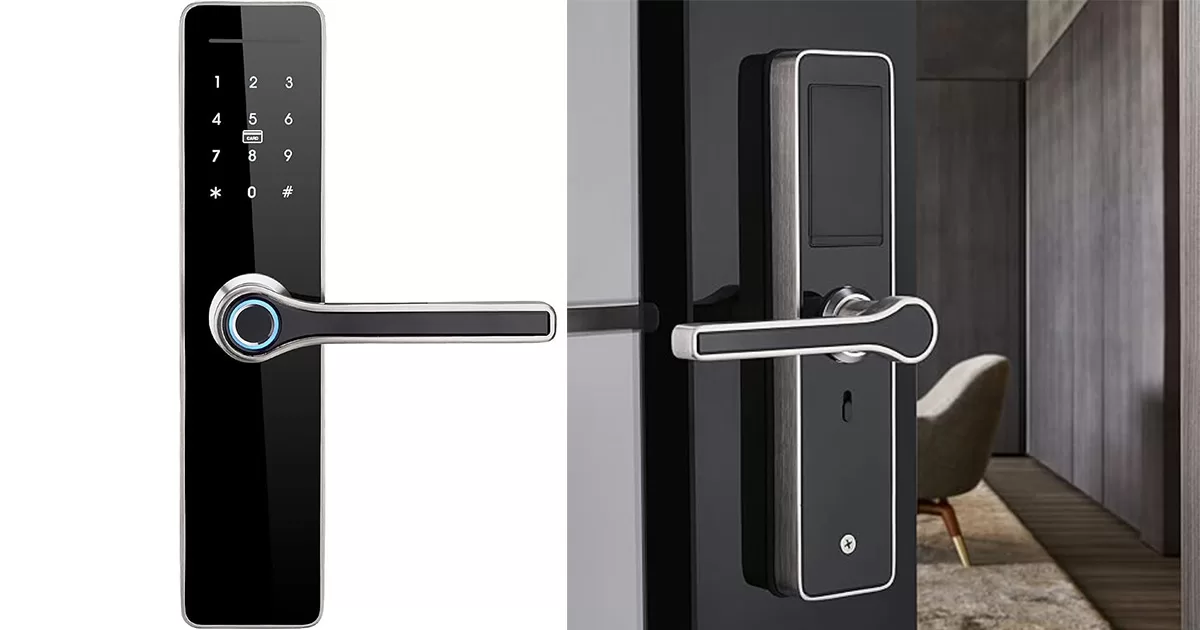
The HAIFUAN 5800 Digital Lock is a solid piece of equipment, made of durable 304 stainless steel. I really like the Password Protect function that allows you to add random numbers before and after your actual code and still gain entry.
The unit also lets you in using fingerprints, access card and a physical key. The keypad illumination is also convenient.
As the lowest-priced unit that I reviewed for this list, it’s a very affordable option for the range of functions it offers
Buy now from Amazon
10. Aqara D200i Smart Lock
Why buy: Integration with Apple Home and 3D face recognition

A classy unit, the Aqara D200i Smart Lock integrates with Apple Home and offers advanced 3D face recognition. The latter is so effective that it is able to recognise most individuals, including children from up to 2 metres away.
There are a stunning 9 ways to unlock – face recognition, password, Bluetooth, Apple Home key, HomeKit, app, NFC, temporary password and physical key. From the inside, you can unlock the door for others through voice control using Siri.
There is a whole range of integrated alarms for additional security, including Door Unclosed, Door Unlocked, Lockpicking detection, Abnormal Home-Leaving, Multiple Unlocking failure and Low Battery.
Buy from Amazon
11. Aqara A100 Smart Lock
Why buy: Integration with Apple Home at a reasonable price

From the medium-priced Aqara range comes the Aqara A100 Smart Lock, still retaining important features such as Apple Home compatibility and the stylish look.
As with its more expensive brethren, this model can be unlocked in 9 ways – face recognition, password, Bluetooth, Apple Home key, HomeKit, app, NFC, temporary password and physical key. It also works with voice control using Siri and Google Assistant. Some advanced features require the Aqara hub (sold separately).
Visually, I also like how the keypad remains invisible until you touch it, and the aluminium finish that resists fingerprints. The Away mode is a convenient addition.
Buy now from Amazon
How to choose the best digital lock for your home or office
Start by deciding how you want to access and manage your door. The Sifely Smart Lock suits households that prioritise fast entry and straightforward DIY installation, while the Aqara U100 Smart Lock with Apple Home Key and Aqara A100 Smart Lock make more sense for users already invested in Apple Home. If remote management and wider smart home compatibility matter, the Tapo DL100 Smart Wi-Fi Deadbolt Door Lock offers extensive connectivity options.
For offices and shared premises, the Harfo Smart Lock and eLink Smart Fingerprint Lock stand out for their large user capacities. Choose the HD20 Face Recognition Digital Lock if visual monitoring is important, or the Yale | LiftMaster Smart Lock if you need to manage multiple doors through a single platform. Buyers focused on value can consider the HAIFUAN 5800 Digital Lock, while the Olumat OL-0825 Smart Lock is better suited to those who place greater weight on warranty and long-term support. The right choice depends on your preferred access method, smart home ecosystem and number of users.
People also read: